Wednesday, October 27, 2010

e-form and WorkFlow

Try to evaluate different e-form products in the past few days. Now have a clearer concept about difference between "e-Form" and "WorkFlow":

Basically "WorkFlow" management and "e-form" are two separated modules (or functions).

An "e-form" is an entity which allows user to "open/fill/save" content of a form. Each “e-form entity” is a single entity which may be stored as a physical file (or a XML record in database). Additional programming effort is required to store the content to separated fields of a relational database.

"WorkFlow” is build on top of "e-form" with other tasks. For example, for a workflow which related to OT cliam/approval. The work flow involves the following tasks:
  • Open e-form of OT claim, fill-in information, save the form to repository and database.
  • Submit (eg: through email) the e-form to Staff A for checking
  • Checked by Staff A and submit (eg: through email) the e-form to Staff B for approval
  • Approved by Staff B and return the e-form to the staff who claim for OT.

The above workflow involves 4 tasks which base on handling and status update related to ONE e-form.

To provide above functions in a flexible e-form system with prelim workflow function, one of the solution will be the following:

The "e-form" provides functions of "e-form filling" with 3 buttons (Submit, Check, Approval) When button of “Submit”, “Check”, “Approval” is clicked, it will call related “Web Services (or function)” of WorkFlow Engine to provide related operation.

  • [Submit]: Save e-form as entity and record in database. Update workflow status and send email alert to Staff A
  • [Check]: Update workflow status and send email alert to Staff B
  • [Approval]: Update workflow status and send email alert to staff who submit the OT Claim.

The e-form interpreter should be capable to enable/disable the button(s) which depends on status of the work flow. Status should be an entity of the XML which represents the e-form.

For simplicity, may consider above is a web-service based solution in which "e-form" is an entity which provides "open/fill/save" operation. Other logic related to workflow operation is done through web service.

Thursday, October 14, 2010

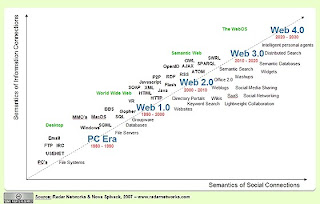
web 4.0

Find an image related to web 4.0, seems interesting and it is related to intelligent personal agent.


Sunday, May 30, 2010

C# - Send email by using CDO

Ref:
http://support.microsoft.com/kb/310212


Example:
try
{
CDO.Message oMsg = new CDO.Message();
CDO.IConfiguration iConfg;

iConfg = oMsg.Configuration;

ADODB.Fields oFields;
oFields = iConfg.Fields;

// Set configuration.
ADODB.Field oField = oFields["http://schemas.microsoft.com/cdo/configuration/sendusing"];

//TODO: To send by using the smart host, uncomment the following lines:
//oField.Value = CDO.CdoSendUsing.cdoSendUsingPort;
//oField = oFields["http://schemas.microsoft.com/cdo/configuration/smtpserver"];
//oField.Value = "smarthost";

// TODO: To send by using local SMTP service.
//oField = oFields["http://schemas.microsoft.com/cdo/configuration/sendusing"];
//oField.Value = 1;

oFields.Update();

// Set common properties from message.

//TODO: To send text body, uncomment the following line:
//oMsg.TextBody = "Hello, how are you doing?";


//TODO: To send HTML body, uncomment the following lines:
//String sHtml;
//sHtml = "\n" +
// "\n" +
// "\n" +
// "\n" +
// "

\n" +
// "

Inline graphics

\n" +
// "\n" +
// "";
//oMsg.HTMLBody = sHtml;

//TOTO: To send WEb page in an e-mail, uncomment the following lines and make changes in TODO section.
//TODO: Replace with your preferred Web page
//oMsg.CreateMHTMLBody("http://www.microsoft.com",
// CDO.CdoMHTMLFlags.cdoSuppressNone,
// "", "");
oMsg.Subject = "Test SMTP";

//TODO: Change the To and From address to reflect your information.
oMsg.From = "someone@example.com";
oMsg.To = "someone@example.com";
//ADD attachment.
//TODO: Change the path to the file that you want to attach.
oMsg.AddAttachment("C:\\Hello.txt", "", "");
oMsg.AddAttachment("C:\\Test.doc", "", "");
oMsg.Send();
}
catch (Exception e)
{
Console.WriteLine("{0} Exception caught.", e);
}
return;
}

Wednesday, May 26, 2010

PDF Writer

http://www.cutepdf.com/Products/CutePDF/writer.asp

Tuesday, April 20, 2010

C# - Example of using Web Application for HTTP POST request

Below is an example of using ASP.NET (with C#) to create Web Application (.ASPX file, with code-behind DLL written in C#) for HTTP POST command:

1) HTTP Post Request (from a windows form application)

string strResult = "";
string strXML = "";
string strMD5 = "key";
string strUserID = "12345678";

try
{
// ----------------------------------------------------------------
// Send HTTP POST command
// ----------------------------------------------------------------
HttpWebRequest request = (HttpWebRequest)HttpWebRequest.Create(
"http://172.18.2...../Test_HTTPPost.ASPX");
request.Method = "POST";

// additional parameters for HTTP header
request.Headers.Add("Encrypt", strMD5);
request.Headers.Add("UserID", strUserID);

// encode HTTP POST data in base-64 format
byte[] szBase64Bytes;

strXML = "....";

szBase64Bytes = new System.Text.UTF8Encoding().GetBytes(strXML);
strXML = System.Convert.ToBase64String(szBase64Bytes);
byte[] byteArray = Encoding.UTF8.GetBytes(strXML);

request.ContentType = "application/x-www-form-urlencoded";
request.ContentLength = byteArray.Length;

Stream dataStream = request.GetRequestStream();
dataStream.Write(byteArray, 0, byteArray.Length);
dataStream.Close();

// Get response
HttpWebResponse response = (HttpWebResponse)request.GetResponse();
dataStream = response.GetResponseStream();
StreamReader reader = new StreamReader(dataStream);

string strTemp = "";
while ((strTemp = reader.ReadLine()) != null)
{
strResult = strResult + strTemp;
}
dataStream.Close();
response.Close();

MessageBox.Show("Result=[" + strResult + "]");
}
catch (Exception ex)
{
MessageBox.Show("Fault. Error=[" + ex.Message + "]");
}

2) Retrieve data for HTTP Post Request (from a ASPX Web Application)

protected void Page_Load(object sender, EventArgs e)
{
string strLogDir = this.Server.MapPath(".\\") + "Log";
Directory.CreateDirectory(strLogDir);
strLogDir = strLogDir + "\\";

LogToFile(strLogDir, "Load Page");

// get request information
int iSize = Request.ContentLength;

// get HTTP header
string strMD5 = Request.Headers["Encrypt"];
string strUserID = Request.Headers["UserID"];

// get HTTP post data
Stream dataStream = Request.InputStream;
StreamReader reader = new StreamReader(dataStream);

string strTemp = "";
string strResult = "";
while ((strTemp = reader.ReadLine()) != null)
{
strResult = strResult + strTemp;
}
dataStream.Close();

if (strResult != "")
{ // Base64 decode of input parameter
byte[] byteArray = System.Convert.FromBase64String(strResult);

System.Text.UTF8Encoding enc = new System.Text.UTF8Encoding();
strResult = enc.GetString(byteArray);
}

LogToFile(strLogDir, "Size=[" + iSize + "]");
LogToFile(strLogDir, "MD5=[" + strMD5 + "]");
LogToFile(strLogDir, "UserID=[" + strUserID + "]");
LogToFile(strLogDir, "Data=[" + strResult + "]");

// response for testing purpose
Response.Write("Test");
Response.End();
}

private static void LogToFile(string strURL,
string strMess)
{
DateTime Now = System.DateTime.Now;
string strLog = "";
string strNow = Now.ToString("yyyyMMdd");

string REQUEST_LOG = strURL + "XXX" + strNow + ".txt";

StreamWriter sr = File.Exists(REQUEST_LOG) ? File.AppendText(REQUEST_LOG) : File.CreateText(REQUEST_LOG);

strLog = Now.ToString("yyyy-MM-dd HH:mm:ss:") + Now.Millisecond.ToString() + "," + strMess;
sr.WriteLine(strLog);

sr.Close();
}

ASP.NET - Web Application

Types of ASP.NET project:

1. ASP.NET Server Control: A custom control which can be added by developer in web site through Visual Studio

2. ASP.NET Web Service: Web Service programming, access APIs through reference of ASMX file

3. ASP.NET Web Application: access C# code-behind function through access of .ASPX file. "Page load" function of code behind C# file will be invoked while the .ASPX page is accessed.

For both of "Web Service" and "Web Application", need to build / convert and / publish the files to server. Also, need to use IIS to create "Virtaul Directory" and select property to create "application" for the two functions.

Thursday, April 8, 2010

ASP.NET - client script to pop-up window

Below is an example to use C# and client script to pop-up an explorer
{
....

string strCmd = "window.open('admin_report_mms_view.aspx?start=" + str_from + "&end=" + str_to + "&CID=" + cid + "', 'window', config='height=450,width=800,resizable=yes,toolbar=0,menubar=0,location=0')";

((ImageButton)e.Row.Cells[4].FindControl("btn_mms")).Attributes.Add("onclick", "return " + strCmd);

//((ImageButton)e.Row.Cells[4].FindControl("btn_mms")).Attributes.Add ("onclick", "return confirm('Test');"); ....

}